프로세스 관리 ⚙️ ▻ pm2
September 11, 2019

💎 목차
⚙️ 설치를 하며
$ npm install pm2 -g😳 명령어 보며
▸ pm2 -v
$ pm2 -v
3.5.1
pm2 버전 확인
▸ pm2 start <id|name>
$ pm2 start ./bin/www
[PM2] Starting /Users/apple/Desktop/pm2/bin/www in fork_mode (1 instance)
[PM2] Done.
┌──────────┬────┬─────────┬──────┬──────┬────────┬─────────┬────────┬─────┬──────────┬───────┬──────────┐
│ App name │ id │ version │ mode │ pid  │ status │ restart │ uptime │ cpu │ mem      │ user  │ watching │
├──────────┼────┼─────────┼──────┼──────┼────────┼─────────┼────────┼─────┼──────────┼───────┼──────────┤
│ www      │ 0  │ 0.0.0   │ fork │ 8369 │ online │ 0       │ 0s     │ 0%  │ 9.2 MB   │ apple │ disabled │
└──────────┴────┴─────────┴──────┴──────┴────────┴─────────┴────────┴─────┴──────────┴───────┴──────────┘
프로세스 실행
▸ pm2 stop <id|name>
$ pm2 stop www
[PM2] Applying action stopProcessId on app [www](ids: 0)
[PM2] [www](0) ✓
┌──────────┬────┬─────────┬──────┬─────┬─────────┬─────────┬────────┬─────┬────────┬───────┬──────────┐
│ App name │ id │ version │ mode │ pid │ status  │ restart │ uptime │ cpu │ mem    │ user  │ watching │
├──────────┼────┼─────────┼──────┼─────┼─────────┼─────────┼────────┼─────┼────────┼───────┼──────────┤
│ www      │ 0  │ 0.0.0   │ fork │ 0   │ stopped │ 0       │ 0      │ 0%  │ 0 B    │ apple │ disabled │
└──────────┴────┴─────────┴──────┴─────┴─────────┴─────────┴────────┴─────┴────────┴───────┴──────────┘
프로세스 중지
▸ pm2 restart <id|name>
$ pm2 restart www
Use --update-env to update environment variables
[PM2] Applying action restartProcessId on app [www](ids: 0)
[PM2] [www](0) ✓
┌──────────┬────┬─────────┬──────┬──────┬────────┬─────────┬────────┬─────┬──────────┬───────┬──────────┐
│ App name │ id │ version │ mode │ pid  │ status │ restart │ uptime │ cpu │ mem      │ user  │ watching │
├──────────┼────┼─────────┼──────┼──────┼────────┼─────────┼────────┼─────┼──────────┼───────┼──────────┤
│ www      │ 0  │ 0.0.0   │ fork │ 8477 │ online │ 1       │ 0s     │ 0%  │ 6.7 MB   │ apple │ disabled │
└──────────┴────┴─────────┴──────┴──────┴────────┴─────────┴────────┴─────┴──────────┴───────┴──────────┘
프로세스 재시작
▸ pm2 delete <id|name>
$ pm2 delete www
[PM2] Applying action deleteProcessId on app [www](ids: 0)
[PM2] [www](0) ✓
┌──────────┬────┬─────────┬──────┬─────┬────────┬─────────┬────────┬─────┬─────┬──────┬──────────┐
│ App name │ id │ version │ mode │ pid │ status │ restart │ uptime │ cpu │ mem │ user │ watching │
└──────────┴────┴─────────┴──────┴─────┴────────┴─────────┴────────┴─────┴─────┴──────┴──────────┘
프로세스 제거
▸ pm2 list
$ pm2 list
┌──────────┬────┬─────────┬──────┬──────┬────────┬─────────┬────────┬──────┬───────────┬───────┬──────────┐
│ App name │ id │ version │ mode │ pid  │ status │ restart │ uptime │ cpu  │ mem       │ user  │ watching │
├──────────┼────┼─────────┼──────┼──────┼────────┼─────────┼────────┼──────┼───────────┼───────┼──────────┤
│ www      │ 0  │ 0.0.0   │ fork │ 8553 │ online │ 2       │ 26s    │ 0.1% │ 37.4 MB   │ apple │ disabled │
└──────────┴────┴─────────┴──────┴──────┴────────┴─────────┴────────┴──────┴───────────┴───────┴──────────┘
프로세스 목록
▸ pm2 show <id|name>
$ pm2 show www
 Describing process with id 0 - name www
┌───────────────────┬──────────────────────────────────────┐
│ status            │ online                               │
│ name              │ www                                  │
│ version           │ 0.0.0                                │
│ restarts          │ 2                                    │
│ uptime            │ 58s                                  │
│ script path       │ /Users/apple/Desktop/pm2/bin/www     │
│ script args       │ N/A                                  │
│ error log path    │ /Users/apple/.pm2/logs/www-error.log │
│ out log path      │ /Users/apple/.pm2/logs/www-out.log   │
│ pid path          │ /Users/apple/.pm2/pids/www-0.pid     │
│ interpreter       │ node                                 │
│ interpreter args  │ N/A                                  │
│ script id         │ 0                                    │
│ exec cwd          │ /Users/apple/Desktop/pm2             │
│ exec mode         │ fork_mode                            │
│ node.js version   │ 10.16.0                              │
│ node env          │ N/A                                  │
│ watch & reload    │ ✘                                    │
│ unstable restarts │ 0                                    │
│ created at        │ 2019-09-11T05:44:28.964Z             │
└───────────────────┴──────────────────────────────────────┘
 Actions available
┌────────────────────────┐
│ km:heapdump            │
│ km:cpu:profiling:start │
│ km:cpu:profiling:stop  │
│ km:heap:sampling:start │
│ km:heap:sampling:stop  │
└────────────────────────┘
 Trigger via: pm2 trigger www <action_name>

 Code metrics value
┌────────────────────────┬───────────┐
│ Heap Size              │ 14.73 MiB │
│ Heap Usage             │ 66.85 %   │
│ Used Heap Size         │ 9.85 MiB  │
│ Active requests        │ 0         │
│ Active handles         │ 4         │
│ Event Loop Latency     │ 2.22 ms   │
│ Event Loop Latency p95 │ 5.70 ms   │
└────────────────────────┴───────────┘
 Divergent env variables from local env


 Add your own code metrics: http://bit.ly/code-metrics
 Use `pm2 logs www [--lines 1000]` to display logs
 Use `pm2 env 0` to display environement variables
 Use `pm2 monit` to monitor CPU and Memory usage www
프로세스 상세 조회
▸ pm2 log
$ pm2 log
[TAILING] Tailing last 15 lines for [all] processes (change the value with --lines option)
/Users/apple/.pm2/pm2.log last 15 lines:
PM2        | 2019-09-11T14:42:42: PM2 log: App [www:0] exited with code [0] via signal [SIGINT]
PM2        | 2019-09-11T14:42:42: PM2 log: pid=8369 msg=process killed
PM2        | 2019-09-11T14:43:39: PM2 log: App [www:0] starting in -fork mode-
PM2        | 2019-09-11T14:43:39: PM2 log: App [www:0] online
PM2        | 2019-09-11T14:43:45: PM2 log: Stopping app:www id:0
PM2        | 2019-09-11T14:43:45: PM2 log: App [www:0] exited with code [0] via signal [SIGINT]
PM2        | 2019-09-11T14:43:45: PM2 log: pid=8468 msg=process killed
PM2        | 2019-09-11T14:43:45: PM2 log: App [www:0] starting in -fork mode-
PM2        | 2019-09-11T14:43:45: PM2 log: App [www:0] online
PM2        | 2019-09-11T14:44:28: PM2 log: Process 0 in a stopped status, starting it
PM2        | 2019-09-11T14:44:28: PM2 log: Stopping app:www id:0
PM2        | 2019-09-11T14:44:28: PM2 log: App [www:0] exited with code [0] via signal [SIGINT]
PM2        | 2019-09-11T14:44:29: PM2 log: pid=8477 msg=process killed
PM2        | 2019-09-11T14:44:29: PM2 log: App [www:0] starting in -fork mode-
PM2        | 2019-09-11T14:44:29: PM2 log: App [www:0] online

/Users/apple/.pm2/logs/www-out.log last 15 lines:
/Users/apple/.pm2/logs/www-error.log last 15 lines:
프로세스 로그파일 확인
▸ pm2 log <id|name>
$ pm2 log www
[TAILING] Tailing last 15 lines for [www] process (change the value with --lines option)
/Users/apple/.pm2/logs/www-out.log last 15 lines:
/Users/apple/.pm2/logs/www-error.log last 15 lines:
특정 프로세스의 로그파일 확인
▸ pm2 flush
$ pm2 flush
[PM2] Flushing /Users/apple/.pm2/pm2.log
[PM2] Flushing:
[PM2] /Users/apple/.pm2/logs/www-out.log
[PM2] /Users/apple/.pm2/logs/www-error.log
[PM2] Logs flushed
로그파일 삭제
▸ pm2 monit
┌─ Process list ──────────────────────────────────────┐┌─ Global Logs ──────────────────────────────────────────────────────────────────────────────────────────────────────────────────┐
│[ 0] www Mem: 30 MB CPU: 0 % online ││ │
│ ││ │
│ ││ │
│ ││ │
│ ││ │
│ ││ │
│ ││ │
│ ││ │
│ ││ │
│ ││ │
│ ││ │
│ ││ │
│ ││ │
│ ││ │
│ ││ │
│ ││ │
│ ││ │
│ ││ │
│ ││ │
│ ││ │
│ ││ │
│ ││ │
│ ││ │
│ ││ │
│ ││ │
│ ││ │
│ ││ │
│ ││ │
│ ││ │
│ ││ │
│ ││ │
│ ││ │
│ ││ │
└─────────────────────────────────────────────────────┘└────────────────────────────────────────────────────────────────────────────────────────────────────────────────────────────────┘
┌─ Custom metrics (http://bit.ly/code-metrics) ───────┐┌─ Metadata ─────────────────────────────────────────────────────────────────────────────────────────────────────────────────────┐
│ Heap Size 13.23 ││ App Name www │
│ Heap Usage 66.42 ││ Version 0.0.0 │
│ Used Heap Size 8.79 ││ Restarts 2 │
│ Active requests 0 ││ Uptime 3m │
│ Active handles 4 ││ Script path /Users/apple/Desktop/pm2/bin/www │
│ Event Loop Latency 2.13 ││ Script args N/A │
│ Event Loop Latency p95 5.54 ││ Interpreter node │
│ ││ Interpreter args N/A │
│ ││ Exec mode fork │
│ ││ Node.js version 10.16.0 │
│ ││ watch & reload ✘ │
└─────────────────────────────────────────────────────┘└────────────────────────────────────────────────────────────────────────────────────────────────────────────────────────────────┘
left/right: switch boards | up/down/mouse: scroll | Ctrl-C: exit To go further check out https://pm2.io/프로세스 실시간 모니터링
🤔 생각해 보며
▸ Cluster Mode
$ pm2 start ./bin/www -i 2
[PM2] Starting /Users/apple/Desktop/pm2/bin/www in cluster_mode (2 instances)
[PM2] Done.
┌──────────┬────┬─────────┬─────────┬──────┬────────┬─────────┬────────┬─────┬───────────┬───────┬──────────┐
│ App name │ id │ version │ mode    │ pid  │ status │ restart │ uptime │ cpu │ mem       │ user  │ watching │
├──────────┼────┼─────────┼─────────┼──────┼────────┼─────────┼────────┼─────┼───────────┼───────┼──────────┤
│ www      │ 0  │ 0.0.0   │ cluster │ 8888 │ online │ 0       │ 0s     │ 0%  │ 32.7 MB   │ apple │ disabled │
│ www      │ 1  │ 0.0.0   │ cluster │ 8889 │ online │ 0       │ 0s     │ 0%  │ 25.2 MB   │ apple │ disabled │
└──────────┴────┴─────────┴─────────┴──────┴────────┴─────────┴────────┴─────┴───────────┴───────┴──────────┘
클러스터 모드로 CPU를 최대한 활용
-i 옵션은 클러스터 모드로 실행하며 뒤에 인스턴스 개수를 지정 가능
0을 지정할 경우 사용 가능한 CPU 개수만큼 실행
▸ pm2 reload <id|name>
$ pm2 reload www
Use --update-env to update environment variables
[PM2] Applying action reloadProcessId on app [www](ids: 0,1)
[PM2] [www](0) ✓
[PM2] [www](1) ✓
클러스터 모드에 사용할 경우 다운타임 없이 서버를 재기동할 수 있다.
▸ Ecosystem File
$ pm2 ecosystempm2 설정 파일 생성
ecosystem.cofing.js
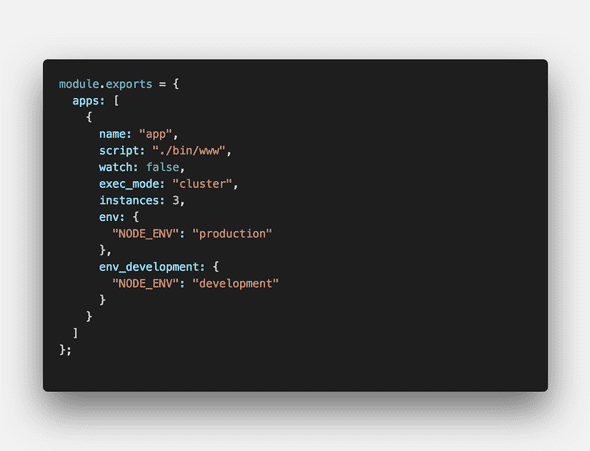
name 실행한 프로세스 이름
script 실행할 파일 경로
watch 파일 변경시 자동으로 재실행 여부 (true, false)
exec_mode 실행 모드 (cluster, fork)
instances cluster로 실행시 인스턴스 개수
env 환경변수로 PORT, NODE_ENV 같은 precess.env.{} 설정
# NODE_ENV=production
$ pm2 start ecosystem.cofing.js

# NODE_ENV=development
$ pm2 start ecosystem.cofing.js --env development출처
![[AGUMON]](/static/eed0671fc085e3aa8976bcf405f9b59d/9d183/profile.jpg)